Jeff Wolf
Each month we will include a short set of reflections about the VERITRACE project: new developments, notable challenges, and lessons learned. Generally, we will rotate authors, so that each team member has a chance to write a post. This inaugural reflection will focus on the technical side of the project.
October and a good chunk of November were devoted to getting to know each other as a team, as well as the primary and secondary sources listed in the project proposal. It was also a chance for me, the digital humanities postdoc, to become acquainted with our primary data sources and to create a proof of concept for the entire team.
There was a lot to learn and a lot to do. My approach was just to get some small piece of the larger puzzle to work, as a proof of concept. So my first task was to see if I could write a custom Python script to interface with the Gallica API(s), download the results of a basic search query, and display the results in a Pandas Data frame. One of the goals of the VERITRACE project, from a technical perspective, is to create a research environment that is independent of the website interfaces of our data sources, so that we just interact with them via API, or – in the case of the EEBO sources – on a local machine. This way, we can combine the data sources and customise our own interface to suit our needs. But we want to at least replicate the search capabilities of the various library websites that we use, so my first task was to do this for the Gallica catalogue.
How did it go? First, I was surprised by how much work was needed to ‘decipher’ the Gallica API(s) and write a script that downloaded the search results. Each API is different, so just because you’ve written API calls before does not mean you can write an API call for a data source that you have never seen before, without some trial and error. For instance, the basic Gallica API (the Gallica Document API) returns results in xml format, whereas I am more accustomed to responses in json. So some XML parsing was required. Also, APIs can be subtly different when it comes to requesting the next page of records (pagination), so some care has to be taken that this is done appropriately.
Second, a certain amount of trust is required in the data source itself, in terms of the quality of the API response. You cannot accept the results unthinkingly. For instance, the Gallica Document API provides a response field called ‘nqamoyen’, which is basically a measure of OCR accuracy, from 0 to 100%. In the Gallica Search API (distinct from the Document API), there is also a free text field, ‘ocrquality’, that searches by the ‘nqamoyen’ field (“ocrquality: this is a free text field allowing the search in the ocerization quality index. The value is between 0 and 100…This allows you to specify a quality value, 100.00 being a faultless OCR. This index is not searchable over an interval.”)
But how was this generated and is it a reliable measure? The Gallica website provides an overview of what they mean by this here: https://www.bnf.fr/fr/techniques-et-formats-de-conversion-en-mode-texte. The gist of it is that the OCR conversion is generally done automatically by software, although they did set up a workflow (in 2018) that was meant to ensure high-enough quality OCR (see the discussion here: https://www.bnf.fr/sites/default/files/2018-11/ocr_controle_qualite.pdf).
In terms of the actual meaning of the quality rating, Gallica tells us that:
Quality rate
The character recognition software assigns for each word a reliability value, indicated in the tag (“word confidence”), and which can range from 0 to 10. This value is used to calculate:
– the quality rate of each page: sum of the for each page divided by the number of words;
– then the quality rate of each document: sum of all the pages of the document, divided by the number of words in the document.
For each document scanned by the BnF, the quality rate automatically calculated by the software is manually checked by the provider on a sample of words, in accordance with ISO 2859-1. This operation confirms the announced quality rate.
For some of the digitized documents, the BnF requires a quality rate higher than 99.9%. For all these documents, regardless of the quality rate after OCR, the provider must guarantee this rate by using all the necessary means of correction, including manuals.
So the OCR software itself provides an automated guess of OCR quality and the provider – Gallica, presumably – then does a manual check on a sample of words (how large? how often?). There is at least a process in place, but my own spot check of OCR quality made me less confident in the OCR quality percentage given.
Let’s take a random example: Gallica tells us that the estimated OCR rate for the following document is 99.1% – so, very high quality: https://gallica.bnf.fr/ark:/12148/bd6t51045643n.r=bd6t51045643n?rk=42918;4#. But here’s what it looks like, with the sample OCR on the left, and the image from which it comes on the right. This is just one page, but it very clearly is not 99.1% accurate:
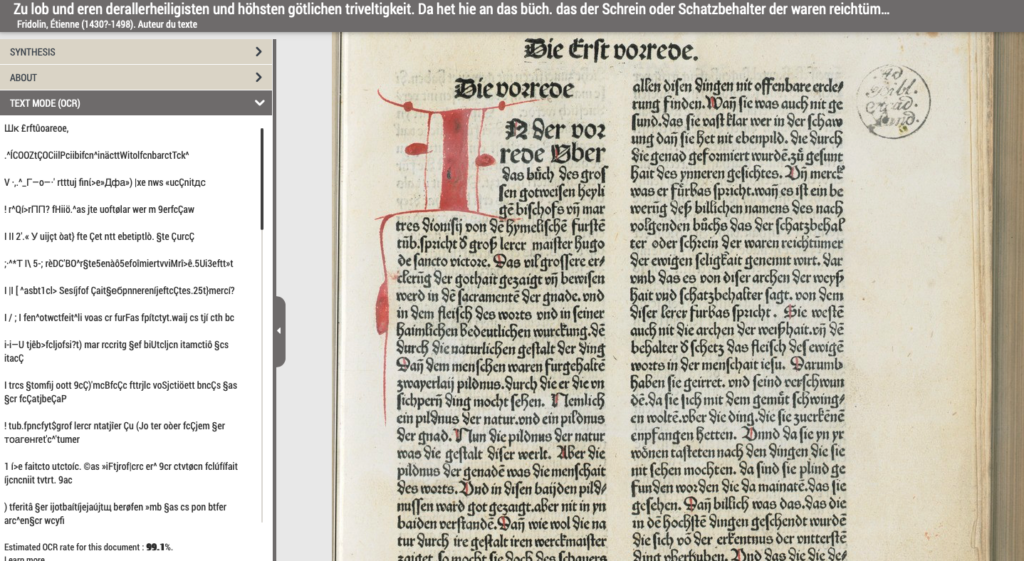
Gallica OCR example
This is not to pick on Gallica per se but to note the challenges of finding and using high-quality digital texts for downstream analysis. In fact, Gallica should be complimented for at least offering a full-featured advanced search service, with search results downloadable as a csv file. This is not always the case. Still: the challenge of working with automated OCR documents remains, and if we simply rely on the OCR quality field that Gallica provides to us via their API, we are likely to overestimate the quality of the digital texts with which we want to work.
We faced other challenges, especially with respect to combining API responses from different data sources. Yet we also made a good deal of progress in a short amount of time. And each challenge deepens our understanding of the project as a whole. So, in that spirit, our work continues.